

Google Ads Budget Allocation and Channel Prioritization Explained: 5 Best Steps for Indian Businesses
Most Indian businesses do not struggle with Google Ads because the platform is weak. They struggle because money gets spread across too many places too early. Google Ads budget allocation is the decision of how much to spend on each campaign type and channel. Channel prioritization decides which ones deserve money first. This guide explains both in five clear steps, with INR examples that make Google Ads budget allocation easier to plan.
Quick answer: Good Google Ads budget allocation starts with the channel closest to buying intent. For most service businesses that is Google Search. For e-commerce brands it is usually Shopping or Performance Max. Give that channel enough budget to collect conversion data, then add reach channels such as YouTube, Display or Demand Gen with a smaller test share. Review results every few weeks and move money toward what brings qualified leads or profitable sales.
What Do Channel Prioritization and Google Ads Budget Allocation Mean?
A channel is a place where your ads appear. A campaign type is how you set up ads to appear there. Search campaigns show on Google Search. Performance Max is different, because it is a single campaign that runs across several places. Those include Google Search, the Google Display Network, YouTube, Discover, Maps, Gmail and Search partners. google
This matters for Google Ads budget allocation because you control money differently in each case. In Search, Shopping or Demand Gen, you decide the budget per campaign. In Performance Max, one budget covers all channels. One agency guide notes that you cannot manually exclude channels or shift budget between them in Performance Max, and the channel report is meant for visibility, not manual control. Google changes features often, so check your own account. jumpfly
How Google Ads Budget Allocation Rules Actually Work
Before you split anything, understand the rules, because they shape your plan.
- Your spend on any given day may exceed your average daily budget by up to 2 times. google
- You will not be charged more than your monthly charging limit, which is 30.4 multiplied by your average daily budget. google
- Changing the average daily budget during the month also changes your monthly spending limit. megadigital
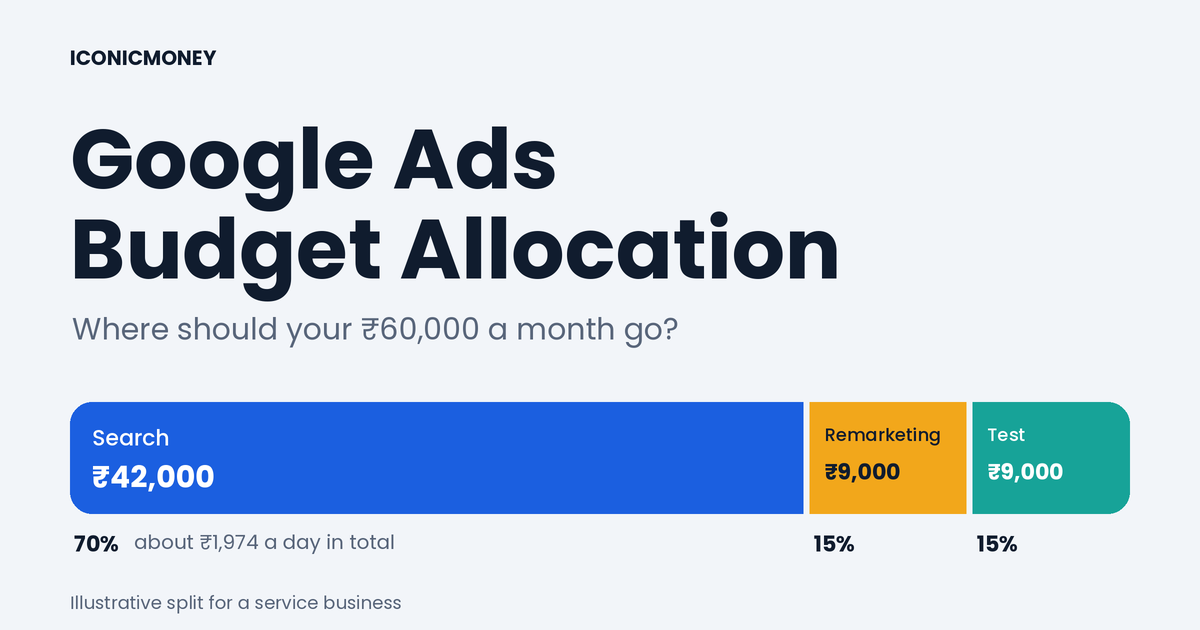
Simple formula: daily budget = monthly budget ÷ 30.4. A ₹60,000 monthly plan means about ₹1,974 per day in total. Because daily spend can swing, do not panic if one day shows more spend than the daily budget.
Step 1: Set a Business Goal Before Google Ads Budget Allocation
Never start Google Ads budget allocation before you know what one lead or sale is worth. Pick one goal per campaign: qualified leads, calls or sales.
Hypothetical example: A service business earns ₹8,000 profit per closed sale, and about 1 in 10 leads closes. Each lead is then worth roughly ₹800 in profit. Your cost per lead must stay well below that figure, or the channel loses money even if it looks busy. Track lead quality, not only the number of leads. For more on lowering lead cost, see our guide on how to reduce cost per lead in Google Ads [add the real URL once published].
If your goal is enquiries rather than direct sales, our lead generation services connect ads, landing pages and follow-up so the metric you track is closer to revenue.
Step 2: Understand What Each Channel Does Best
Knowing each channel’s role makes Google Ads budget allocation much simpler.
| Channel / campaign type | Main role | Best for | Watch out for |
|---|---|---|---|
| Google Search | Captures existing demand | Service businesses, local leads | Cost per click can be high in competitive niches |
| Shopping | Shows products with price and image | E-commerce with a clean product feed | Needs a good Merchant Center feed |
| Performance Max | Automation across channels | Stores and lead gen with strong assets and tracking | Less manual control; needs good conversion data |
| Demand Gen | Visual discovery on YouTube, Discover and Gmail | Reaching people before they search | Lower immediate intent |
| YouTube / Video | Awareness and storytelling | Brand building, remarketing | Hard to judge by last-click leads alone |
| Display | Reach and remarketing | Reminding past visitors | Often low intent if used for cold traffic |
Search usually shows the clearest link between spend and enquiries, which is why it often comes first. Reach channels help you grow, but they work best after Search is stable.
Step 3: Prioritize Channels with a Simple Scoring Framework
Score each channel from 1 to 5 on these five factors:
- Buying intent: How close is the audience to purchase?
- Tracking quality: Can you measure leads or sales on this channel?
- Creative readiness: Do you have the images, videos and copy it needs?
- Budget fit: Is there enough budget to gather data?
- Lead or sale value: Does the channel’s likely return justify the cost?
Add the scores out of 25. Fund the highest scorers first. A channel scoring under 15 gets a small test budget or waits. Use this score to guide your Google Ads budget allocation each month.
Hypothetical scoring for a local service business: Search 22, remarketing 17, YouTube 11. The decision: Search first, remarketing second, YouTube later. This is a decision tool, not a Google rule, so adjust the factors to your business.
Step 4: Split Your Google Ads Budget Allocation with Starting Frameworks
The splits below are starting hypotheses, not benchmarks. Your own data should replace them within a few weeks.
| Business type | Core (about 60-80%) | Growth (about 10-25%) | Test (about 5-15%) |
|---|---|---|---|
| Local service / lead gen | Search | Remarketing | Demand Gen or YouTube |
| E-commerce with product feed | Shopping or Performance Max | Search (brand and non-brand) | Demand Gen, YouTube |
| New business with small budget | Search only | None at first | None at first |
A common planning approach is the 70/20/10 rule: 70% on proven campaigns, 20% on promising ones, 10% on experiments. It is a planning habit, not a Google requirement.
For small budgets, simple Google Ads budget allocation works best: fewer campaigns, each with enough money to learn. Many campaigns with tiny budgets collect data slowly, and automated bidding needs conversion data to learn. If you run an online store, our eCommerce growth and CRO services help you fix product pages so the budget you allocate converts better.
Step 5: Review and Reallocate Your Google Ads Budget Allocation
Google Ads budget allocation is not a one-time decision. Review it on a schedule.
For Performance Max, use the channel performance report. It has three sections: a performance summary, a Channels-to-Goals chart and a channel distribution table. Use it to see which surfaces get spend and where conversions come from. Then act on what you see: google
- If YouTube or Display takes spend without leads, check creative and tracking before cutting.
- If Search carries most results, protect its budget first.
- If a reach channel brings assisted conversions, keep it as a test, not a core line.
Practical review rules:
- Review every two weeks, not daily. Give campaigns time to learn.
- Move budget in steps (many advertisers use changes of about 20% at a time). This is a practitioner guideline, not a Google rule.
- Judge by qualified leads or profitable sales, not clicks.
- Ask your sales team which leads were actually good.
Example: Google Ads Budget Allocation Plan of ₹60,000 per Month
This is an illustrative example for a Delhi service business, not a client result.
| Line | Share | Monthly | Approx. daily |
|---|---|---|---|
| Google Search (core) | 70% | ₹42,000 | ₹1,382 |
| Remarketing (Display / YouTube) | 15% | ₹9,000 | ₹296 |
| Demand Gen / YouTube test | 15% | ₹9,000 | ₹296 |
After four weeks, compare cost per qualified lead. If remarketing brings cheaper qualified leads, raise it slightly. If the test line brings clicks but no enquiries, reduce it and fix creative before trying again. Landing page quality changes everything. A slow or confusing page wastes any budget, so our website design and development team often fixes the page before increasing spend.
Common Google Ads Budget Allocation Mistakes
- Splitting a small budget across five campaign types at once.
- Judging channels by cost per click instead of cost per qualified lead.
- Changing budgets every day, which disrupts learning.
- Running reach campaigns before Search tracking works.
- Ignoring lead quality feedback from the sales team.
- Forgetting that mid-month budget changes affect the monthly limit.
- Running Google Ads alone when audiences also respond to social. A joined-up plan with our Meta Ads management can capture demand Google cannot.
When to Get Expert Help with Google Ads Budget Allocation
If your leads are costly, inconsistent or low quality, the cause may be tracking, landing pages or an unclear channel plan rather than budget size. Our Google Ads management services cover campaign structure, tracking, reporting and practical Google Ads budget allocation.
Need help deciding where your Google Ads budget should go?
ICONICMONEY helps businesses improve their digital marketing through Google Ads management, lead generation and conversion-focused websites. Get in touch to discuss your goals and explore a strategy suited to your business. Request a Free Marketing Audit
Conclusion
Good Google Ads budget allocation starts with a clear money metric, a scoring-based channel priority and a small test budget for growth. Start with the channel closest to intent, give it enough budget to learn, and review on a steady schedule. Add reach channels only when the core is stable. Apply these steps, and your Google Ads budget allocation becomes a repeatable process instead of a guess. For more practical guides, visit the ICONICMONEY blog.
FAQs About Google Ads Budget Allocation
1. How should I handle Google Ads budget allocation between Search and Performance Max?
Start from your goal. Service businesses usually give most of the budget to Search and test Performance Max later. Stores with a clean feed may lead with Performance Max or Shopping. Treat any split as a starting hypothesis and adjust using conversion data.
2. How much should I spend on Google Ads per month in India?
There is no single right number. Work backwards: decide how many qualified leads or sales you want, estimate your acceptable cost per lead or sale, and multiply. Start with an amount that lets your main campaign collect enough conversions to learn.
3. Can I control budget by channel in Performance Max?
Not manually, as reported by agency guides. You set one campaign budget and can review where spend and conversions came from in the channel performance report. Confirm in your account, as features change.
4. What does the 30.4 rule mean in Google Ads?
Monthly budget is the daily budget multiplied by 30.4, the average number of days in a month. Google also states you will not be charged more than that monthly limit, so it is a key number in Google Ads budget allocation.
5. How often should I change my Google Ads budget?
Review every one to two weeks and change in small steps. Frequent large changes make it harder for automated bidding to learn, and mid-month changes also alter your monthly limit.
6. Which Google Ads channel is best for lead generation?
For most local and service businesses, Google Search is the usual starting point because people are actively looking. YouTube, Demand Gen and Display usually work better as remarketing or reach support.